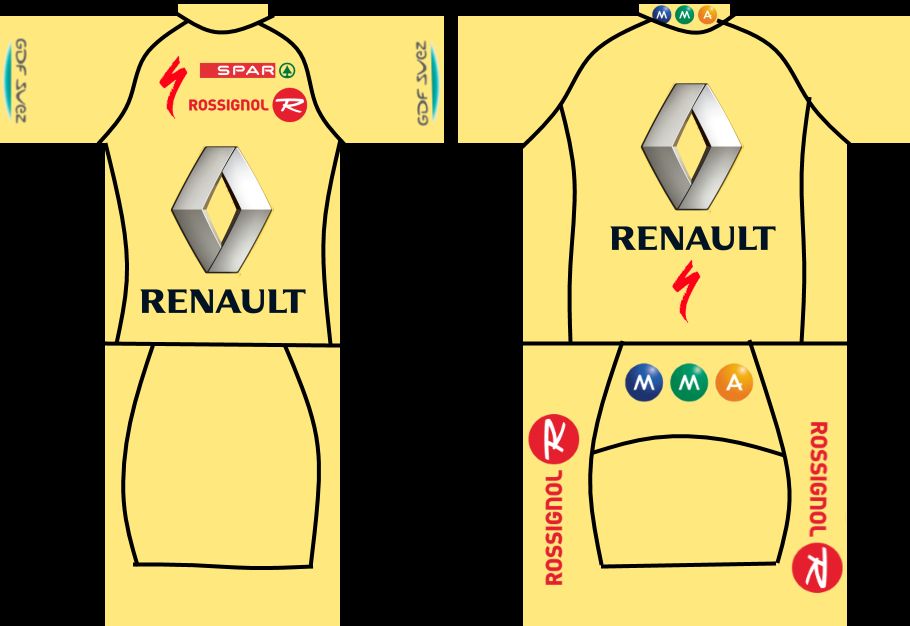
|
Graphics by Kiserlovski01
|
| the_hoyle |
Posted on 03-03-2015 21:37
|

Grand Tour Champion

Posts: 7592
Joined: 28-05-2009
PCM$: 300.00
|
Looking good
.: Manager of :.
 .: My Awards :.










 |
| |
|
|
| Scattershot Will |
Posted on 03-03-2015 21:47
|

Domestique

Posts: 479
Joined: 14-07-2014
PCM$: 200.00
|
sorry to use your jersey, but this is what it would look like with seams
Bob Jungels- LEGEND
JUNGELSFAN |
| |
|
|
| Kiserlovski01 |
Posted on 04-03-2015 07:46
|

Grand Tour Specialist
Posts: 4085
Joined: 26-04-2012
PCM$: 200.00
|
Scattershot Will wrote:
sorry to use your jersey, but this is what it would look like with seams
I see. I normally use them but the template I used for this jersey didn't seem to be transparent, so when I pasted it in a new layer, my entire jersey was covered by it 
the_hoyle: thanks  |
| |
|
|
| Scattershot Will |
Posted on 04-03-2015 07:47
|
Domestique
Posts: 479
Joined: 14-07-2014
PCM$: 200.00
|
well here is what i would say, i used my template to place the lines right and that is all i did
Bob Jungels- LEGEND
JUNGELSFAN |
| |
|
|
| Kiserlovski01 |
Posted on 04-03-2015 07:50
|
Grand Tour Specialist
Posts: 4085
Joined: 26-04-2012
PCM$: 200.00
|
I used the template you made for MARSUPILAMI, but used it the wrong way. I wanted to have the pants in black. I'll most likely make an update.
EDIT: the problem is I normally disable the layer that contains the stitches but when I do this with your template, the black pants also disappear..
Edited by Kiserlovski01 on 04-03-2015 07:54
|
| |
|
|
| Scattershot Will |
Posted on 04-03-2015 08:06
|
Domestique
Posts: 479
Joined: 14-07-2014
PCM$: 200.00
|
This is because they are all one layer, Do you use paint.net+
Bob Jungels- LEGEND
JUNGELSFAN |
| |
|
|
| Kiserlovski01 |
Posted on 04-03-2015 08:18
|
Grand Tour Specialist
Posts: 4085
Joined: 26-04-2012
PCM$: 200.00
|
Yes, I do |
| |
|
|
| the_hoyle |
Posted on 04-03-2015 08:34
|
Grand Tour Champion
Posts: 7592
Joined: 28-05-2009
PCM$: 300.00
|
Is there a multiply option on .Net when adding new layers? If so you can paste in the new layer and merge to two together without having to restart again
.: Manager of :.
.: My Awards :.
|
| |
|
|
| Kiserlovski01 |
Posted on 04-03-2015 08:37
|
Grand Tour Specialist
Posts: 4085
Joined: 26-04-2012
PCM$: 200.00
|
That could be an interesting technique for the future, I had already started making an update
|
| |
|
|
| the_hoyle |
Posted on 04-03-2015 08:42
|
Grand Tour Champion
Posts: 7592
Joined: 28-05-2009
PCM$: 300.00
|
I prefer the black shorts also if you look through the threads may people have published the plis for different jersey makers. The main part of the plis is blank so it avoids the issue with covering your jersey
.: Manager of :.
.: My Awards :.
|
| |
|
|
| Kiserlovski01 |
Posted on 04-03-2015 08:43
|
Grand Tour Specialist
Posts: 4085
Joined: 26-04-2012
PCM$: 200.00
|
the_hoyle wrote:
Is there a multiply option on .Net when adding new layers? If so you can paste in the new layer and merge to two together without having to restart again
I tried but the template and stitches don't perfectly fit the 2014 jersey template so I'd had to restart anyway, I think  |
| |
|
|
| Ad Bot |
Posted on 13-09-2026 17:10
|
Bot Agent
Posts: Countless
Joined: 23.11.09
|
|
| IP: None |
|
|
| Kiserlovski01 |
Posted on 04-03-2015 08:44
|
Grand Tour Specialist
Posts: 4085
Joined: 26-04-2012
PCM$: 200.00
|
the_hoyle wrote:
I prefer the black shorts also if you look through the threads may people have published the plis for different jersey makers. The main part of the plis is blank so it avoids the issue with covering your jersey
I'll certainly look for some stitches, thanks |
| |
|
|
| Scattershot Will |
Posted on 06-03-2015 07:31
|
Domestique
Posts: 479
Joined: 14-07-2014
PCM$: 200.00
|
Kiserlovski01 wrote:
Yes, I do
I can make them a different layer then if you want
Bob Jungels- LEGEND
JUNGELSFAN |
| |
|
|
| Kiserlovski01 |
Posted on 06-03-2015 19:20
|
Grand Tour Specialist
Posts: 4085
Joined: 26-04-2012
PCM$: 200.00
|
Scattershot Will wrote:
Kiserlovski01 wrote:
Yes, I do
I can make them a different layer then if you want
Thanks, but I think this jersey is fine now
Edited by Kiserlovski01 on 06-03-2015 19:21
|
| |
|
|
| Kiserlovski01 |
Posted on 07-03-2015 23:26
|
Grand Tour Specialist
Posts: 4085
Joined: 26-04-2012
PCM$: 200.00
|
I finished the first NC for my Renault shirt:
The NC may be a bit different from the main jersey when it comes to placing of the logos. That's because the stitches and the template I used didn't go well together so I had to begin from scratch.
That's also the reason why the pants are entirely white... I'm just not that good with adding shapes myself.
As always, any feedback is more than welcome
And also huge thanks to Tomazio for his NC templates and to the_hoyle for sharing these with me 
Edited by Kiserlovski01 on 07-03-2015 23:29
|
| |
|
|
| sutty68 |
Posted on 08-03-2015 17:24
|
Tour de France Champion

Posts: 33999
Joined: 22-08-2010
PCM$: 200.00
|
Looks good |
| |
|
|
| Kiserlovski01 |
Posted on 08-03-2015 18:52
|
Grand Tour Specialist
Posts: 4085
Joined: 26-04-2012
PCM$: 200.00
|
Thanks sutty |
| |
|
|
| Kiserlovski01 |
Posted on 12-03-2015 10:55
|
Grand Tour Specialist
Posts: 4085
Joined: 26-04-2012
PCM$: 200.00
|
I don't want to force upon anyone at all, but next Saturday I'm leaving for a school trip of 10 days.
I have one free afternoon left, so if I can help anyone with an avatar, just say the word!
Edited by Kiserlovski01 on 12-03-2015 10:59
|
| |
|
|
| Kiserlovski01 |
Posted on 25-03-2015 14:50
|
Grand Tour Specialist
Posts: 4085
Joined: 26-04-2012
PCM$: 200.00
|
I made some NC's for my Renault jersey:
|
| |
|
|
| sutty68 |
Posted on 25-03-2015 17:01
|
Tour de France Champion
Posts: 33999
Joined: 22-08-2010
PCM$: 200.00
|
They all look really good, nice work. |
| |
|