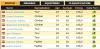
When I downloaded pcm daily 2013 all in one DB I got a lot of new flags but also a problem, some countries like Indonesia, have pick squares, how do I fix this.
1. I think this is for pcm 13, so don't know if it will work for me.
2. I don't have a file like this backup.
3. It says it is for equipment, does that matter
4. Am I looking at the right question, there are so many.
Edited by The Hobbit on 20-09-2013 10:24
2. Yes, you do. It's in Program Files/Cyanide/Pro Cycling Manager (or, if you have the Steam version of the game, Program Files\Steam\steamapps\common\Pro Cycling Manager).
3. Purple flags OR purple equipment photos. I'm pretty sure you have both problems.
4. There's four questions ...
There's purple flags or purple icons in the equipment selection screen.
This means that the game isn't using the Local.cdb file that's compatible with the PCM.daily DB.
Open up the folder where Pro Cycling Manager is installed and find the folder called PCM.daily DB Backup. Inside it, there's a Local.cdb. Copy it to My Documents/Pro Cycling Manager 2012. Replace the existing file.
If you use Steam, you need to copy the Local.cdb to the Database folder of your installation - e.g. C:\Program Files\Steam\steamapps\common\Pro Cycling Manager - Season 2013\Database
CrueTrue wrote:
1. The thread I linked to is in a PCM13 forum.
2. Yes, you do. It's in Program Files/Cyanide/Pro Cycling Manager (or, if you have the Steam version of the game, Program Files\Steam\steamapps\common\Pro Cycling Manager).
3. Purple flags OR purple equipment photos. I'm pretty sure you have both problems.
4. There's four questions ...
There's purple flags or purple icons in the equipment selection screen.
This means that the game isn't using the Local.cdb file that's compatible with the PCM.daily DB.
Open up the folder where Pro Cycling Manager is installed and find the folder called PCM.daily DB Backup. Inside it, there's a Local.cdb. Copy it to My Documents/Pro Cycling Manager 2012. Replace the existing file.
If you use Steam, you need to copy the Local.cdb to the Database folder of your installation - e.g. C:\Program Files\Steam\steamapps\common\Pro Cycling Manager - Season 2013\Database