|
Help with PCM Data Base Editor
|
| alnibbles |
Posted on 16-08-2012 14:52
|
Stagiare

Posts: 242
Joined: 15-08-2012
PCM$: 200.00
|
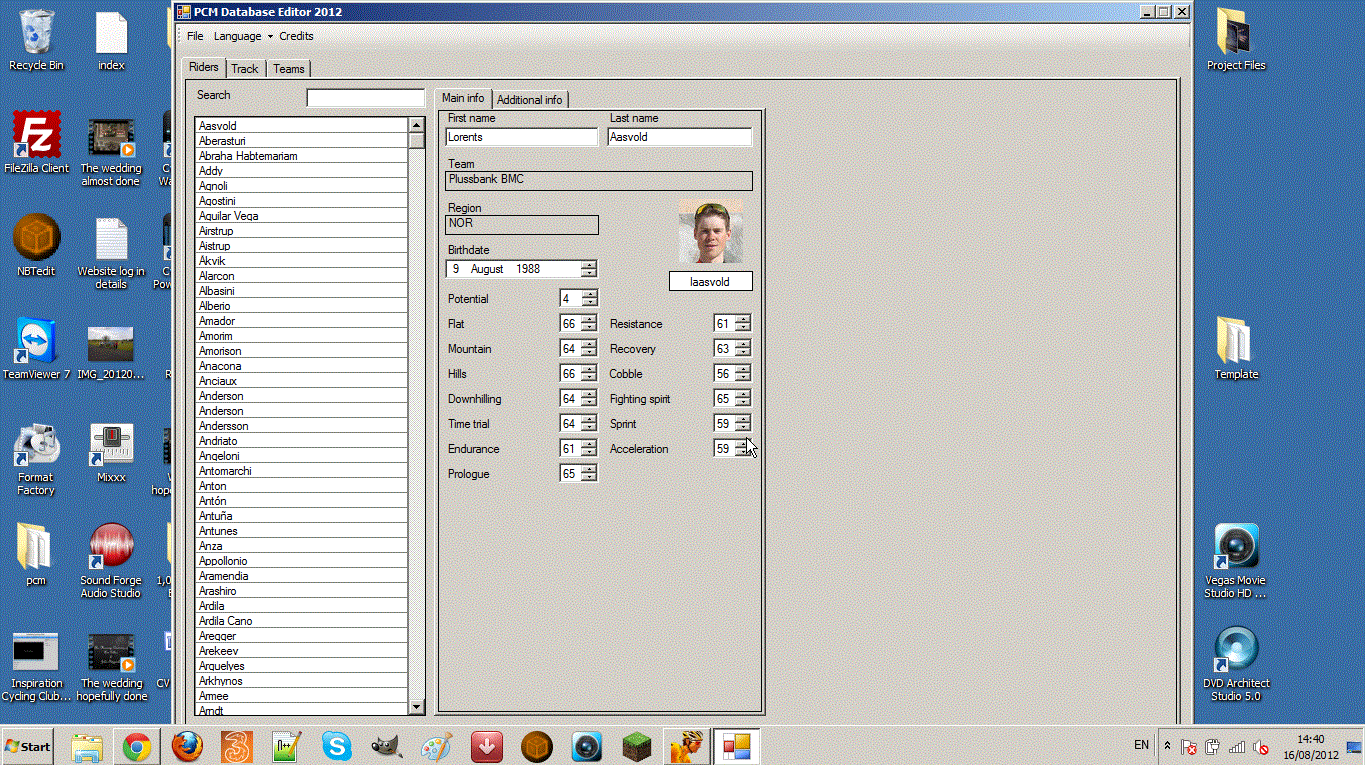
As you can see from the image i can not get to the option tabs at the bottom of the Data Base editor :-( , please help, Thanks
|
| |
|
|
| sutty68 |
Posted on 16-08-2012 15:17
|

Tour de France Champion

Posts: 33999
Joined: 22-08-2010
PCM$: 200.00
|
You must have the task bar locked  |
| |
|
|
| alnibbles |
Posted on 16-08-2012 16:06
|
Stagiare
Posts: 242
Joined: 15-08-2012
PCM$: 200.00
|
I unlocked it but it is still the same   |
| |
|
|
| slbmangas |
Posted on 16-08-2012 16:14
|

Neo-Pro

Posts: 271
Joined: 25-04-2010
PCM$: 200.00
|
alnibbles wrote:
I unlocked it but it is still the same
Are you sure?
|
| |
|
|
| Pellizotti2 |
Posted on 16-08-2012 16:25
|

Grand Tour Champion

Posts: 9885
Joined: 01-05-2010
PCM$: 200.00
|
Move the taskbar to the left or right side of the screen.
|
| |
|
|
| sutty68 |
Posted on 16-08-2012 16:46
|
Tour de France Champion
Posts: 33999
Joined: 22-08-2010
PCM$: 200.00
|
Have you tried altering your computers Appearance and Personalization through your Control Panel |
| |
|
|
| Ad Bot |
Posted on 12-09-2026 19:53
|
Bot Agent
Posts: Countless
Joined: 23.11.09
|
|
| IP: None |
|
|
| alnibbles |
Posted on 16-08-2012 17:00
|
Stagiare
Posts: 242
Joined: 15-08-2012
PCM$: 200.00
|
sutty68 wrote:
Have you tried altering your computers Appearance and Personalization through your Control Panel
I have tried but no luck |
| |
|
|
| alnibbles |
Posted on 16-08-2012 17:04
|
Stagiare
Posts: 242
Joined: 15-08-2012
PCM$: 200.00
|
Pellizotti2 wrote:
Move the taskbar to the left or right side of the screen.
Thanks SO Much!!!! :) :banana: :P
The problem is solved |
| |
|