|
Makeing shirt in pcm
|
| naksss |
Posted on 24-05-2011 19:25
|
Amateur

Posts: 13
Joined: 16-05-2010
PCM$: 200.00
|
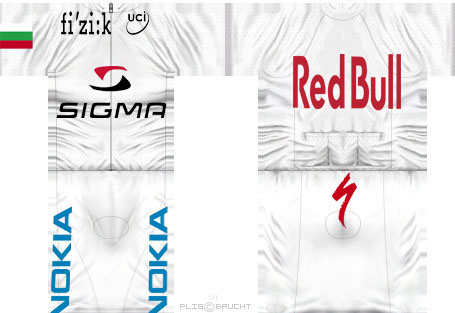
Can you tell me how to do a detailed shirt |
| |
|
|
| Ad Bot |
Posted on 19-06-2026 12:34
|
Bot Agent
Posts: Countless
Joined: 23.11.09
|
|
| IP: None |
|
|
| roturn |
Posted on 24-05-2011 19:39
|

Team Manager

Posts: 22114
Joined: 24-11-2007
PCM$: 3900.00
|
You need some knowledge in programs like Photoshop, Gimp or maybe even Pain.NET. You need to use several layers and masks.
Then this thread might help you.
https://pcmdaily.c...rowstart=0 |
| |
|
|
| naksss |
Posted on 24-05-2011 20:14
|
Amateur
Posts: 13
Joined: 16-05-2010
PCM$: 200.00
|
roturn wrote:
You need some knowledge in programs like Photoshop, Gimp or maybe even Pain.NET. You need to use several layers and masks.
Then this thread might help you.
https://pcmdaily.c...rowstart=0
Thanks for help.How to create shirt with sponsor |
| |
|
|
| roturn |
Posted on 24-05-2011 21:27
|
Team Manager
Posts: 22114
Joined: 24-11-2007
PCM$: 3900.00
|
It`s all in the link I gave you. Sponsors are on page 2. |
| |
|
|
| naksss |
Posted on 25-05-2011 06:31
|
Amateur
Posts: 13
Joined: 16-05-2010
PCM$: 200.00
|
roturn wrote:
It`s all in the link I gave you. Sponsors are on page 2.
Thanks |
| |
|
|
| naksss |
Posted on 25-05-2011 12:45
|
Amateur
Posts: 13
Joined: 16-05-2010
PCM$: 200.00
|
how to import t-shirt in game |
| |
|
|
| CrueTrue |
Posted on 25-05-2011 13:16
|

Tour de France Champion

Posts: 27880
Joined: 20-10-2006
PCM$: 200.00
|
https://pcmdaily.com/articles.php?arti...icle_id=91 |
| |
|
|
| naksss |
Posted on 25-05-2011 13:24
|
Amateur
Posts: 13
Joined: 16-05-2010
PCM$: 200.00
|
Thanks |
| |
|
|
| naksss |
Posted on 26-05-2011 18:14
|
Amateur
Posts: 13
Joined: 16-05-2010
PCM$: 200.00
|
but such folder named Cyanide i dont have in program files |
| |
|
|
| CrueTrue |
Posted on 26-05-2011 19:26
|
Tour de France Champion
Posts: 27880
Joined: 20-10-2006
PCM$: 200.00
|
Well, you have installed the game somewhere... So find the folder where the game is installed and follow the guide from there. |
| |
|
|
| naksss |
Posted on 27-05-2011 06:41
|
Amateur
Posts: 13
Joined: 16-05-2010
PCM$: 200.00
|
CrueTrue wrote:
Well, you have installed the game somewhere... So find the folder where the game is installed and follow the guide from there.
Well, when i put the file in folder CM_Textures -> cycliste -> team -> c00 not again , but the file is format tga |
| |
|
|
| naksss |
Posted on 27-05-2011 07:24
|
Amateur
Posts: 13
Joined: 16-05-2010
PCM$: 200.00
|
KenL wrote:
naksss wrote:
CrueTrue wrote:
Well, you have installed the game somewhere... So find the folder where the game is installed and follow the guide from there.
Well, when i put the file in folder CM_Textures -> cycliste -> team -> c00 not again , but the file is format tga
All the maillots and accessories in the team folders are in TGA format, what did you save yours as? If it is a png, jpeg or bmp then you will have to convert it to a TGA with your graphics program.
Or you can "open" the current c00_maillot.tga with your graphics program and then "copy and paste" your 455 x 313 bmp/png/jpeg over the current c00_maillot and "save".
I wanted to say that the file is tga and not again |
| |
|
|
| naksss |
Posted on 27-05-2011 15:50
|
Amateur
Posts: 13
Joined: 16-05-2010
PCM$: 200.00
|
[quote]KenL wrote:
What do you mean by "not again"?
You made a tga file for your maillot but it still doesn't show up in game?
Attach your c00_maillot.tga and I will check it out [/quote [/quote
Yes my maillot doesn't show in game
naksss attached the following image:
|
| |
|
|
| naksss |
Posted on 27-05-2011 19:13
|
Amateur
Posts: 13
Joined: 16-05-2010
PCM$: 200.00
|
KenL wrote:
I converted your jpeg to a TGA , tried it in game and it works for me. Not sure where you are having a problem if you have already done this?
Here is a link to the TGA of your maillot I used....give it a try.
https://www.mediaf...na21671ifh
Thank you |
| |
|
|
| naksss |
Posted on 27-05-2011 19:35
|
Amateur
Posts: 13
Joined: 16-05-2010
PCM$: 200.00
|
I put the file in folder 00 ,01,02 and nothing , what you have folder with named c0 and tcc , because i have 19 folder . |
| |
|
|
| naksss |
Posted on 28-05-2011 09:16
|
Amateur
Posts: 13
Joined: 16-05-2010
PCM$: 200.00
|
Can you some video to show how it's done |
| |
|
|
| naksss |
Posted on 29-05-2011 06:44
|
Amateur
Posts: 13
Joined: 16-05-2010
PCM$: 200.00
|
This is may first mailot |
| |
|