semmellance1 wrote:
No it doesn't work....Becaus you can't save the final work as TGA file....
I make my jerseys with Paint.net...It's really easy, and you can found also a explanation on Forum.
No youre wrong!!! I do all my jerseys with gimp.
You can save your work as tga file however the problem is that gimp doesnt always save it as a 32-bit tga.
So to be sure, create the jersey save it as tga in gimp and let it run through paint.net
That means you open it, save it (without any changes) as 32-bit tga-file
Guys, to make the jersey authenticyou ha´ve to use a program where you can work with different layers such as gimp. This is importend as you cant put the plis layer on the jersey in paint.net. This is importend, cause it has all the shadings and stitches...
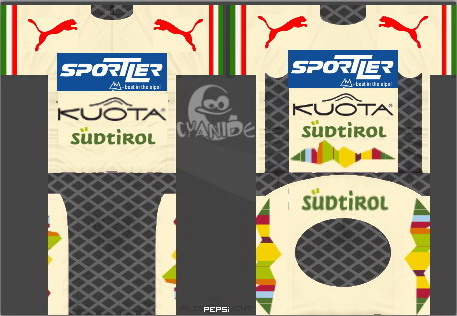
If you look at this jersey i made for a guy on this forum, you can see the shadings that make it more authentic.
Oh jph, i do the verandas willems shirt for pcmcentral today, sorry that it took me so long
semmellance1 wrote:
No it doesn't work....Becaus you can't save the final work as TGA file....
I make my jerseys with Paint.net...It's really easy, and you can found also a explanation on Forum.
No youre wrong!!! I do all my jerseys with gimp.
You can save your work as tga file however the problem is that gimp doesnt always save it as a 32-bit tga.
So to be sure, create the jersey save it as tga in gimp and let it run through paint.net
That means you open it, save it (without any changes) as 32-bit tga-file.
I do mine with GIMP, but It doesn't say whether it is a 32 bit TGA, so I'll try that method.
semmellance1 wrote:
No it doesn't work....Becaus you can't save the final work as TGA file....
I make my jerseys with Paint.net...It's really easy, and you can found also a explanation on Forum.
No youre wrong!!! I do all my jerseys with gimp.
You can save your work as tga file however the problem is that gimp doesnt always save it as a 32-bit tga.
So to be sure, create the jersey save it as tga in gimp and let it run through paint.net
That means you open it, save it (without any changes) as 32-bit tga-file
Guys, to make the jersey authenticyou ha´ve to use a program where you can work with different layers such as gimp. This is importend as you cant put the plis layer on the jersey in paint.net. This is importend, cause it has all the shadings and stitches...
If you look at this jersey i made for a guy on this forum, you can see the shadings that make it more authentic.
Oh jph, i do the verandas willems shirt for pcmcentral today, sorry that it took me so long
Last time I checked, the layer function was still available in Paint.NET?
semmellance1 wrote:
No it doesn't work....Becaus you can't save the final work as TGA file....
I make my jerseys with Paint.net...It's really easy, and you can found also a explanation on Forum.
No youre wrong!!! I do all my jerseys with gimp.
You can save your work as tga file however the problem is that gimp doesnt always save it as a 32-bit tga.
So to be sure, create the jersey save it as tga in gimp and let it run through paint.net
That means you open it, save it (without any changes) as 32-bit tga-file
Guys, to make the jersey authenticyou ha´ve to use a program where you can work with different layers such as gimp. This is importend as you cant put the plis layer on the jersey in paint.net. This is importend, cause it has all the shadings and stitches...
If you look at this jersey i made for a guy on this forum, you can see the shadings that make it more authentic.
Oh jph, i do the verandas willems shirt for pcmcentral today, sorry that it took me so long
Last time I checked, the layer function was still available in Paint.NET?
I have the newest version but i cant work with different layers...